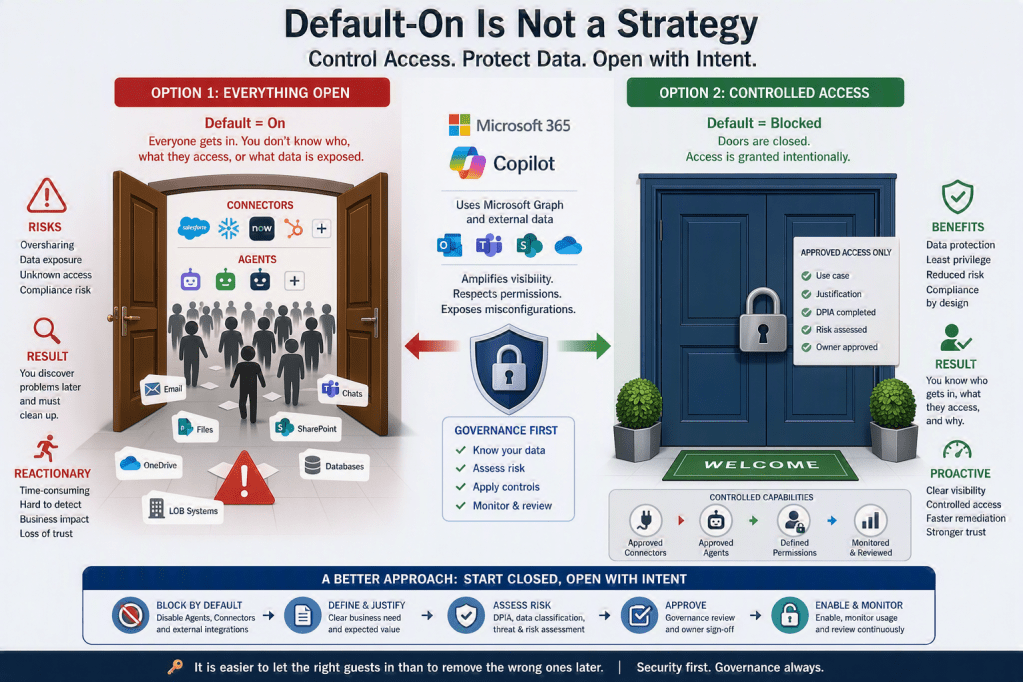
There is a pattern in Microsoft 365: new capabilities—especially around Copilot, Agents, and Connectors—are increasingly rolled out with default = on.
On the surface, this makes sense. It accelerates adoption, shortens time-to-value, and helps organizations quickly explore innovation. But if your philosophy is “security first”, this approach introduces a fundamental problem:
You are effectively opening every door before you even know who might walk in.
The Core Issue with “Default = On”
When features are enabled automatically, several risks emerge immediately:
- Lack of visibility
- Many organizations do not have a complete overview of:
- Which agents are active
- Which connectors are available
- What data sources they can access
- Many organizations do not have a complete overview of:
- Uncontrolled data exposure
- Agents and connectors can operate across:
- SharePoint
- OneDrive
- Teams
- External systems
- Without governance, sensitive information may be surfaced in unintended contexts.
- Agents and connectors can operate across:
- Implicit trust model
- Default-on assumes that:
- The feature is safe
- The configuration is appropriate
- The organization is ready
- In reality, none of these are guaranteed.
- Default-on assumes that:
- Security teams are put in reactive mode
- Instead of controlling access upfront, they must:
- Discover what is enabled
- Investigate usage
- Disable or restrict after the fact
- Instead of controlling access upfront, they must:
The Problem with third party Agents and Connectors
Agents and connectors are powerful by design—they are meant to:
- Aggregate data
- Provide insights
- Automate tasks across systems
But that power comes with responsibility. Before enabling them, you need to understand:
- What data does this agent/connector use?
- Where does it pull data from?
- What permissions does it inherit?
- Can it expose data across users or contexts?
- Is the data processed locally, or sent to external services?
If you don’t have clear answers to these questions, enabling them is not innovation—it’s risk acceptance without awareness.
A Better Strategy: Start Closed, Open with Intent
A strong governance approach flips the default mindset:
Instead of trying to close doors after people have entered, you control who gets in from the start.
Recommended approach
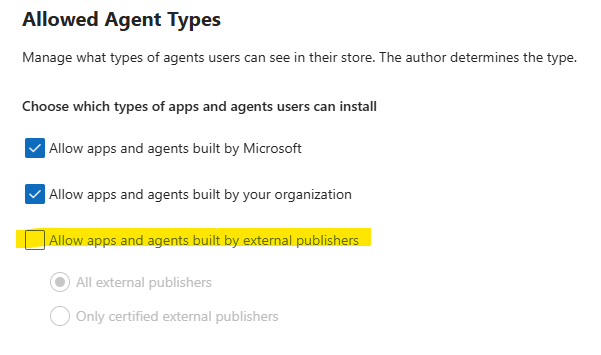
- Block all third party Agents and Connectors initially
- Disable them tenant-wide where possible
- Prevent automatic exposure to users
- Create an approval process
- Define:
- Business justification
- Data classification impact
- Owner accountability
- Define:
- Perform a DPIA (Data Protection Impact Assessment)
- Evaluate:
- Personal data usage
- Cross-border data flows
- Risk of unintended exposure
- Evaluate:
- Conduct a risk assessment
- Identify:
- Worst-case scenarios
- Likelihood of misuse or misconfiguration
- Technical and organizational safeguards
- Identify:
- Enable selectively
- Only after:
- Risks are understood
- Controls are in place
- Value is clearly defined
- Only after:
Security First Means Being Strict Early
Many organizations say they prioritize security—but their configuration tells a different story.
If everything is open by default, then:
- Security is not proactive
- Governance is not enforced
- Risk is not controlled
A security-first approach requires discipline at the beginning:
- Be strict when new capabilities are introduced
- Avoid enabling features simply because they exist
- Require justification before activation
At the same time, this does not mean slowing down the business.
Don’t Be Slow—Be Deliberate
There is an important distinction:
- Strict does not mean slow
- Controlled does not mean blocking innovation
A mature organization:
- Moves quickly when there is a clear use case
- Has predefined processes to:
- Assess risk
- Approve usage
- Enable safely
This allows you to:
- Stay secure
- Enable innovation
- Reduce friction between IT and the business
The Guest Analogy
Think of your Microsoft 365 tenant as a building.
You have two choices:
Option 1: All doors open
- Everyone can walk in
- You don’t know:
- Who they are
- What they access
- Later, you try to:
- Identify unwanted guests
- Remove them
This is expensive, reactive, and often incomplete.
Option 2: Controlled access
- Doors are closed by default
- Guests are invited intentionally
- You decide:
- Who gets access
- Where they can go
This is predictable, secure, and scalable.
It is always easier to let the right people in than to remove the wrong ones afterward.
Final Thought
My opinion is that Microsoft’s common “default-on” strategy is designed for speed and adoption—but it is not a substitute for governance.
If your organization truly believes in security first, then:
- You cannot accept everything being open by default
- You must take ownership of your configuration
- You must control Agents and Connectors before they control your data exposure
Start closed. Open with purpose. Move fast—but only after you understand the risk.







Leave a Reply