
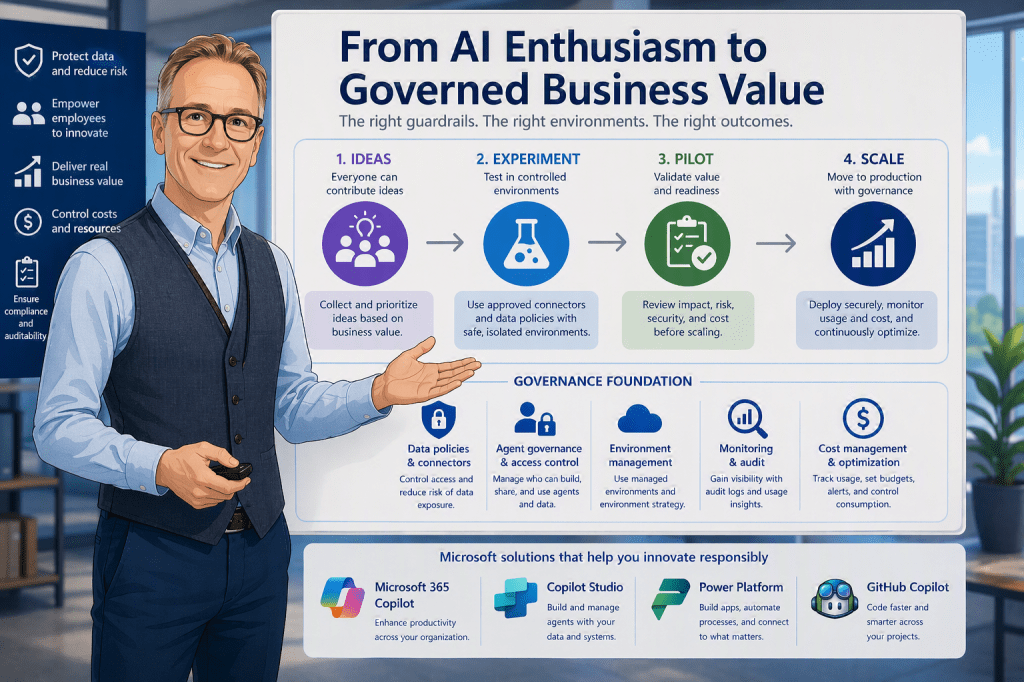
This post is a practical walkthrough of the governance, security, and lifecycle foundations every organization should have in place before makers start building — and the new control plane (Agent 365) that ties it all together. All recommendations are based on official Microsoft documentation.
Why this matters
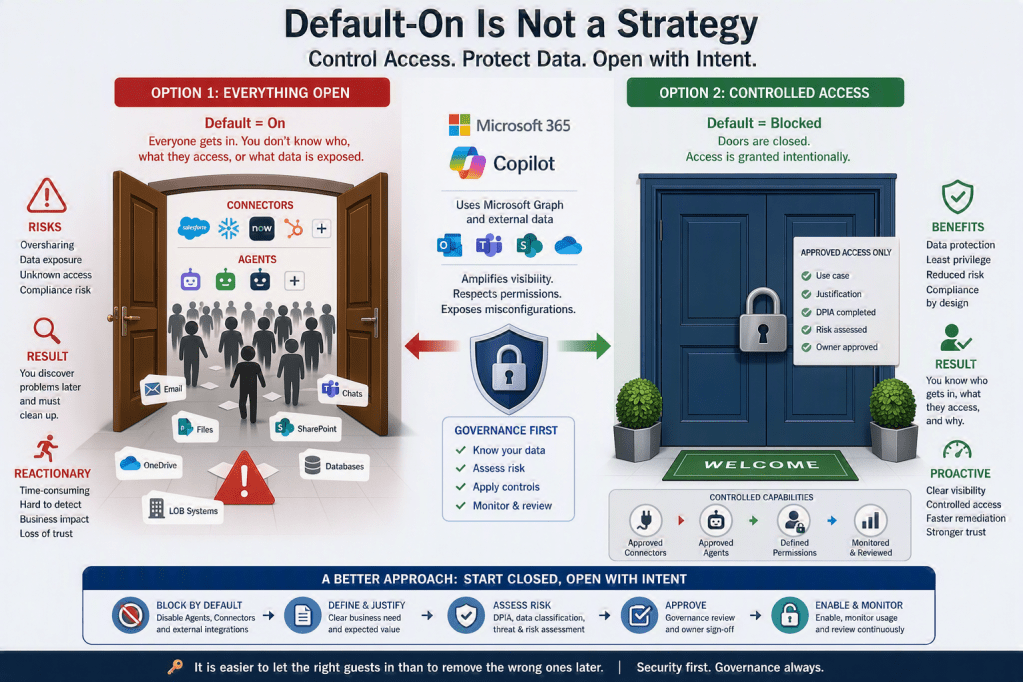
Microsoft 365 Copilot and any agents you build in Copilot Studio retrieve data from Microsoft Graph and respect the existing permissions, sharing settings, and policies on that data. Translation: an agent is only as trustworthy as the underlying tenant. If your content is overshared, your environments are unmanaged, or your ALM is improvised, those weaknesses will surface to end users on day one. [learn.microsoft.com]
Microsoft’s own guidance is to treat agentic AI as a system that needs to be observed, governed, and secured — not a side project. That is exactly the framing behind Agent 365, the new control plane I cover later in this article. [learn.microsoft.com]
Below is a six-point pre-flight checklist.
1. SharePoint Site Ownership and Content Relevance — use SharePoint Advanced Management (SAM)
Copilot answers will only be as good as the content it can reach. Microsoft’s official guidance is to prepare your environment using SharePoint Advanced Management (SAM), administered from the SharePoint admin center. [learn.microsoft.com], [learn.microsoft.com]
What to do, in plain steps
- Run the Content Management Assessment (CMA). From the SharePoint admin center, open Advanced Management and start the assessment. It identifies overshared content, inactive or ownerless sites, defines Copilot readiness, and provides actionable remediation. Microsoft recommends rerunning it every 30 days to track progress. [learn.microsoft.com]
- Set site ownership policies. Define who owns each site, set minimum owner/admin counts, and automate notifications when sites fall out of compliance. [learn.microsoft.com]
- Manage inactive sites and request attestations. Detect inactive sites and require owners to confirm necessity, ownership, members, permissions, and sharing on a recurring basis. This is the single most effective way to keep Copilot responses anchored in current content. [learn.microsoft.com]
- Prevent oversharing. SAM provides layered reports, insights, and policies that enforce least-privilege access across SharePoint and OneDrive — directly reducing the risk that an agent surfaces sensitive content. [learn.microsoft.com]
- Use lifecycle management and archiving. Automated policies reduce sprawl, ensure Copilot references current content, and lower storage costs. [learn.microsoft.com]
Treat SAM as your visibility and control layer for content. It does not replace good governance, but it is Microsoft’s official toolkit for making the SharePoint side of your tenant Copilot-ready.
2. Configure Copilot- and Agent settings in the Microsoft 365 Admin Center
The Microsoft 365 admin center is the central control plane for tenant-wide Copilot and agent behavior, through the Copilot Control System and the Agent settings page. [learn.microsoft.com], [learn.microsoft.com]
Key configuration areas
- Use least-privileged roles. To view and change Copilot scenarios, sign in with the AI Administrator role. Use (only if necessary) Global Reader for view-only. Microsoft explicitly recommends reserving Global Administrator for emergencies. [learn.microsoft.com]
- Agent settings page. This is where you enforce security, compliance, and governance for agents: [learn.microsoft.com]
- Agent management rules — bulk governance actions (install Microsoft first-party agents at scale, reassign ownerless “Agent Builder agents” to a user’s manager). [learn.microsoft.com]
- Allowed agent types — specify which categories of agents are permitted. [learn.microsoft.com]
- Security templates — preset policies, rules, and allow-lists for new agents. [learn.microsoft.com]
- Sharing — decide who can share agents and how. [learn.microsoft.com]
- User access — control which users or groups can interact with agents. [learn.microsoft.com]
Decide which agent categories are allowed, who can share them, and which users can use them — before makers start publishing.
3. Get Tenant settings right in the Power Platform Admin Center (PPAC)
Copilot Studio is built on Power Platform, so the Power Platform Admin Center is where you set the boundaries for makers. Microsoft consolidates Copilot-related controls under Copilot → Settings in PPAC, grouped by product (Power Platform, Copilot Studio, Power Apps, Power Automate, D365). [learn.microsoft.com]
What to validate
- Configure who can author agents. Settings apply at the environment level and, with Managed Environments, across environment groups via rules. [learn.microsoft.com]
- Control agent sharing through Managed Environments. Sharing limits are configured as a Managed Environments control in PPAC. Apply them per environment or at scale via environment groups and rules. Use the Editor and Viewer roles to govern how makers share. Note: rules are enforced on new share actions and can take up to an hour to take effect. [learn.microsoft.com]
- Define who can use AI features in model-driven apps via allow/exclude lists (currently in preview, requires Managed Environments). [learn.microsoft.com]
- Use environment groups and rules to apply settings consistently rather than configuring each environment by hand. [learn.microsoft.com]
PPAC is where “policy meets practice.” Without Managed Environments, most powerful sharing and governance levers either don’t apply or have to be configured one environment at a time.
4. Turn on Environment Routing for Personal Developer Environments (PDEs)
The biggest risk in early Copilot Studio adoption is everyone building in the Default environment. Microsoft now provides a first-class solution: Environment Routing. [learn.microsoft.com]
What it does
- Environment routing is a premium governance feature that automatically directs new or existing makers into their own personal developer environment when they visit Copilot Studio, Power Apps, Power Automate, or Power Automate for desktop — instead of dumping them in the shared Default environment. [learn.microsoft.com]
- Personal Developer Environments (PDEs) give each maker a personal, safe space to build with Dataverse without others accessing their apps or data. [learn.microsoft.com]
- All developer environments created through environment routing are Managed Environments by default, with admin settings preconfigured by the assigned environment group rules. [learn.microsoft.com]
- Multi-rule environment routing lets tenant admins define multiple routing rules to direct different sets of makers to different environment groups across portals. [learn.microsoft.com]
Why You should care
Microsoft IT (MSIT) transitioned makers from the shared Default environment to PDEs and reported 32% month-over-month growth in personal productivity assets under the new model — with better governance, not worse. [microsoft.com]
Turning on Environment Routing is the single highest-leverage decision for protecting your Default environment while enabling makers.
5. Establish Dev, Test, and Production environments — and use pipelines for ALM
Once routing is in place for individuals, you still need an enterprise ALM model for agents heading toward production.
The three-environment baseline (per Microsoft)
A healthy ALM strategy includes at least three environments: development, test, and production. Developers make changes in Dev, promote to Test, fix issues found by testers, then deploy to Production. [learn.microsoft.com]
Microsoft’s specific configuration guidance: [learn.microsoft.com]
- Configure the production environment as a Production type.
- Configure all other environments (including Dev and Test) as Sandbox type.
- Secure every environment with an Entra Security Group to limit access to its members.
- Use solutions as containers to transport artifacts and customizations across environments.
- Use environment variables for environment-specific settings and connection references for environment-specific connections.
- Enable source control.
Why pipelines are the win
Microsoft explicitly lists the benefits of healthy ALM: [learn.microsoft.com]
- Reliable releases — reduced risk of errors and consistent deployments.
- Governance and compliance — enforced organizational policies and security standards.
- Scalability and reuse — solutions grow without reinventing processes.
- Quality at speed — rapid delivery without sacrificing quality.
- Business continuity — minimized downtime during updates.
- Team collaboration — better coordination across developers, testers, and operations.
- End-to-end discipline — structure at every phase of the lifecycle.
You can implement CI/CD using Power Platform pipelines (low-code, in-product), GitHub Actions, or Azure DevOps. [learn.microsoft.com]
Bonus: automated testing inside pipelines
Microsoft documents a pattern that combines Power Automate cloud flows, Dataverse, and the Copilot Studio Kit to validate agents with automated test runs, enforce quality gates, reduce manual steps, and ensure that only reliable agents reach production. [learn.microsoft.com]
Pipelines are not a “nice to have.” They are how you turn agents from a fast-but-fragile experiment into a governed, auditable, repeatable enterprise capability.
6. Bring it all together with Microsoft Agent 365
Even with everything above in place, you still face a hard truth: agents will be built across many tools, frameworks, and platforms. You need one view of every agent in your organization. That is what Microsoft Agent 365 is for.
What Agent 365 is — in one line
Microsoft’s official definition:“Agent 365 is the control plane for IT and security leaders to observe, secure, and govern agents across the organization.” It is generally available as of May 1, 2026. [learn.microsoft.com], [learn.microsoft.com]
What information you see in Agent 365
Agent 365 surfaces three categories of insight, all reachable from the Microsoft 365 admin center: [learn.microsoft.com], [learn.microsoft.com]
A. Observe — visibility into your agent fleet
- An Agent registry giving a single, centralized inventory of every agent in your organization, regardless of where it was built (Copilot Studio, Azure Foundry, third-party platforms, open-source frameworks). [learn.microsoft.com]
- A unified view of agent adoption, activity, and agent health, with role-specific dashboards for AI admins, security leaders, and business leaders. [learn.microsoft.com]
- Agent Map in the Microsoft 365 admin center to visualize relationships and behavior. [learn.microsoft.com]
- Performance, behavior, and risk signals captured before they impact the business. [learn.microsoft.com]
- Registry sync so existing agents built on any framework can be brought under management. [learn.microsoft.com]
B. Govern — guardrails and lifecycle
- Centralized lifecycle management, access control, and compliance through the Agent 365 registry, integrated with Microsoft Entra and Microsoft Purview. [learn.microsoft.com]
- Policy templates applied automatically as agents are onboarded, with IT approval flows built in. [learn.microsoft.com]
- Least-privilege access controls — choose exactly which users, data, and tools an agent can use. [learn.microsoft.com]
- Rules-based automation to flag ownerless or risky agents and enforce retirement policies, similar to what Managed Environments do for makers. [learn.microsoft.com]
C. Secure — protection at runtime
- Microsoft Entra enforces consistent, risk-based access controls for both users and the agents acting on their behalf. [learn.microsoft.com]
- Microsoft Purview provides data risk visibility, information protection, DLP, and risk safeguards across agents. [learn.microsoft.com]
- Microsoft Defender adds continuous threat detection and real-time runtime protection to block unsafe behaviors and malicious activity. [learn.microsoft.com]
- Observability is required and built on OpenTelemetry, feeding unified audit logs into Defender and Purview. [learn.microsoft.com]
When (and why) you should use it
Use Agent 365 when any of the following is true:
- You are about to move from pilots to enterprise-scale agent adoption — Agent 365 is positioned as the gate between experimentation and production deployment. [learn.microsoft.com]
- You have agents being built across multiple tools or platforms (Copilot Studio + Azure Foundry + third-party + open-source) and need a single registry. [learn.microsoft.com]
- You need audit-ready compliance with centralized policies, retention, and reviews. [learn.microsoft.com]
- You suspect or know you have“shadow agents” running locally that nobody has registered. Agent 365 can discover more than 20 kinds of local agents, including coding agents and Model Context Protocol (MCP) servers. [ca.news.yahoo.com]
- You want to secure agent identities and runtime behavior with Entra, Purview, and Defender rather than building bespoke controls per agent. [learn.microsoft.com]
Why this is the keystone
The previous five sections of this article each solve part of the problem — content, tenant policy, platform policy, maker isolation, and lifecycle. Agent 365 is the layer that lets you see and govern the result: every agent that emerges from those processes, plus every agent that didn’t (the ones makers spun up on other tools). Microsoft explicitly positions it as the answer to “fragmented, high-risk experimentation” — converting it into “trusted, enterprise-wide AI operations”. [learn.microsoft.com]
CIO takeaway: If steps 1–5 are about preparing for agents, step 6 is about operating them. Agent 365 is currently licensed at $15/user/month (annual commitment) in the Commercial segment, with deeper bundling in Microsoft 365 E7. [microsoft.com]
A short pre-flight checklist for
| Area | Action | Microsoft tool |
|---|---|---|
| Content readiness | Run CMA, fix oversharing, set site ownership and lifecycle policies | SharePoint Advanced Management [learn.microsoft.com], [learn.microsoft.com] |
| Tenant Copilot policy | Configure allowed agent types, sharing, user access, security templates | Microsoft 365 admin center — Agent settings & Copilot Control System [learn.microsoft.com], [learn.microsoft.com] |
| Platform policy | Apply Managed Environments controls, sharing limits, environment groups & rules | Power Platform Admin Center — Copilot → Settings [learn.microsoft.com], [learn.microsoft.com] |
| Maker isolation | Turn on Environment Routing so makers land in their own PDE | PPAC — Tenant settings → Environment routing [learn.microsoft.com] |
| Lifecycle | Dev (sandbox) → Test (sandbox) → Prod (production), secured with Entra groups; deploy via pipelines | Copilot Studio ALM + Power Platform pipelines [learn.microsoft.com], [learn.microsoft.com] |
| Enterprise control plane | Observe, govern, and secure every agent — including those built outside Microsoft tools | Microsoft Agent 365 (GA May 1, 2026) [learn.microsoft.com], [learn.microsoft.com] |
Final word
The pattern across all six areas is the same: Microsoft has already built the governance toolkit. What’s required from leadership is the decision to turn it on before makers start shipping agents to colleagues — and to bring those agents under one control plane the moment scale appears on the horizon. Do this work first, and Copilot Studio plus Agent 365 become a competitive advantage with a defensible risk posture. Skip it, and every weakness in your tenant becomes a Copilot answer waiting to happen.
Sources (all official Microsoft documentation and Microsoft properties)
- SharePoint Advanced Management — [learn.microsoft.com], [learn.microsoft.com]
- Microsoft 365 admin center — Copilot & Agent settings — [learn.microsoft.com], [learn.microsoft.com]
- Power Platform Admin Center — Copilot Settings & Managed Environments — [learn.microsoft.com], [learn.microsoft.com]
- Environment Routing & PDEs — [learn.microsoft.com], [microsoft.com]
- Copilot Studio ALM, environments, pipelines — [learn.microsoft.com], [learn.microsoft.com]
- Microsoft Agent 365 — overview, admin center, observability — [learn.microsoft.com], [learn.microsoft.com], [learn.microsoft.com], [learn.microsoft.com], [learn.microsoft.com], [microsoft.com]






Leave a Reply