
As you probably already know, in Microsoft Teams, any user in the organization can sign up for Public Teams while Private teams require the owner of the team to invite members to the team. Unless users know which private teams already exist, the risk of unnecessarily establishing new teams, with the same purpose and similar content, increases.
Therefore, to avoid (or at least reduce the risk of) this type of Team Sprawl, it can be smart to make private teams visible even to those who are not members of them.
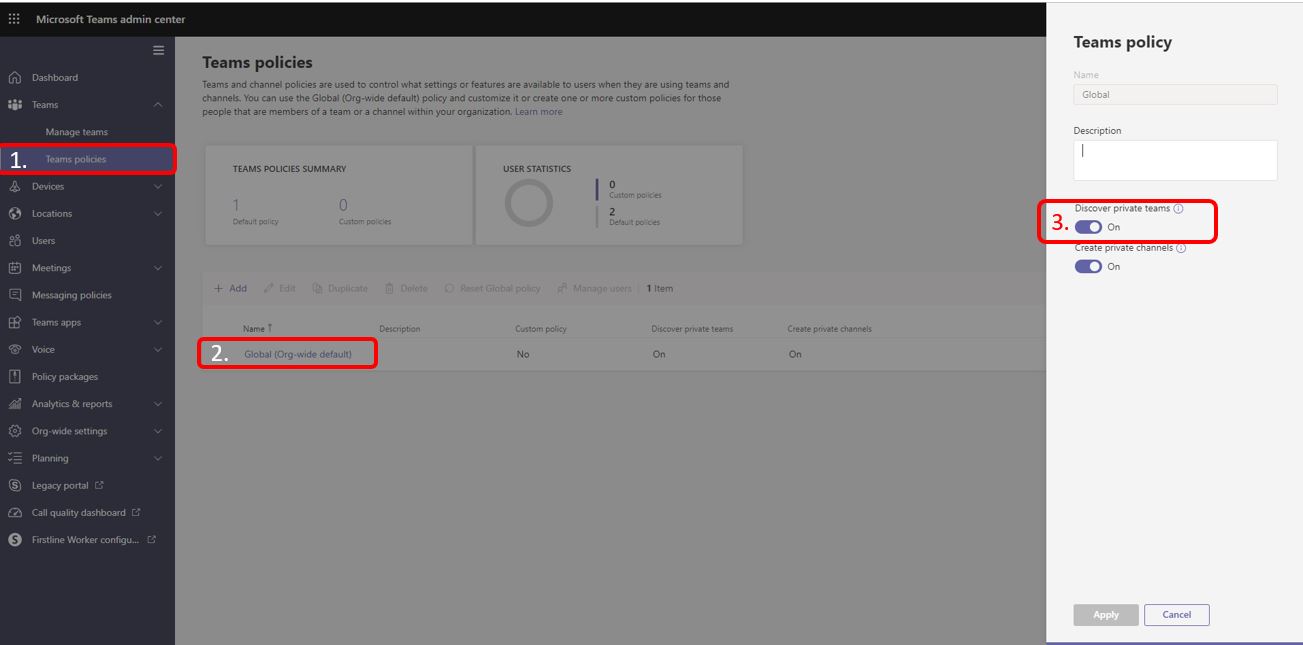
You find this setting in the Microsoft Teams admin center and by activating the discovery of Private teams You let people search for (and find) Private teams that have been created. When they find the private team they can then ask for access to it.
(Photo by Terence Starkey on Unsplash)








 Providing Tips
Leave a comment