It’s probably no news to you that I’m a big fan of Viva Engage and also Microsoft Teams. It’s no news to you that I think it’s important to use these really good productivity tools in the right way. Using cloud services means, among other things, that there are be a lot of updates and that these updates come in a steady stream.
- Some updates involve major changes to the way you work.
- Some updates give you more choice and flexibility.
- Some updates involve improvements to existing ways of working.
Microsoft is now Unifying company communication and Connection further by Introducing communities in Teams. Now Viva Engage Communties will/can appear together with Private chats and Channel posts.
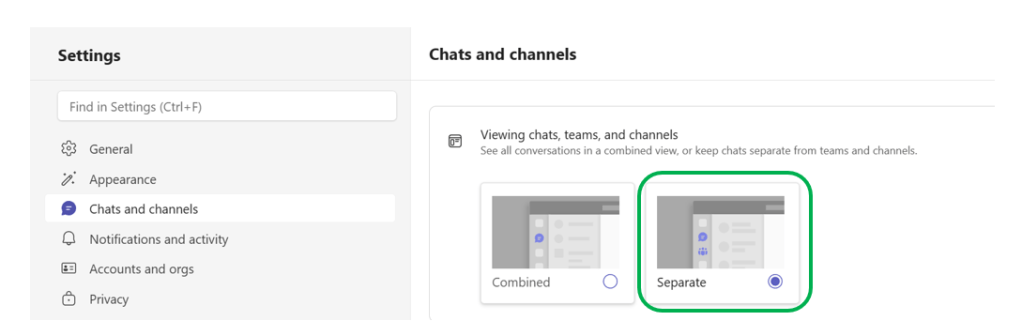
This can make it easier for people at work to find important information and join conversations, because everything is in one place. I welcome this new functionality for the sake of freedom of choice, but for the sake of clarity, I would recommend that you keep the content fom Viva Engage communities separate from the normal work-/project related channel posts and private chats by keeping chats separate from teams and channels instead of seeing all conversations in a combined view.
I’ve always heard (and said) that you shouldn’t mix apples and pears. We all know that if you store them together in the same box, the ripening process is accelerated and they all quickly become overripe.

Let me make the following analogy:
- Private chats are bananas
- Team channel posts are Apples
- Viva Engage posts are pears.

Keep them in the same room but in different boxes. That way, it will be easier to find the fruit (or type of post) you want and it will stay relevant much longer.
In my opinion the Separate view makes it easier for you as an end user to distinguish between what is “important information for Everyone”, “Project related communication” and what is just “everyday work talk in a smaller Group” so you don’t accidentally post in the wrong place. In a previous post “Use Microsoft Teams the right way Part 13 – Chat and channels Combined View or Chat and channels Separate View” you can see how to choose Separate view instead of Combined.
In the post “Teams Integrates Viva Engage Communities” on Office 365 for IT Pros you can read more about this and see information on how to deactivate this new functionality (which I have done in order to avoid further confusion among end users) without deactivating the regular Communities app (which I think works brilliantly).
With these experience-based reflections and thoughts, I hope you adopt and leverage the power and benefits of the new functionality provided by the now announced Communities functionality in Teams so that your (and your colleagues’) Collaboration and Communication becomes even more streamlined and structured.
And, if you haven’t yet started using Microsoft 365 Copilot in Viva Engage, you should take a closer look. Read more about this here: Get Started with Microsoft 365 Copilot in Viva Engage






 Providing Tips
Leave a comment